A lot of group ticket sales start the same way. One inbox thread turns into six. A school organizer wants reserved seating, a company contact needs an invoice, a community group asks if names can be changed later, and someone on your team is trying to match all of it in a spreadsheet that nobody trusts anymore.
That setup works right up until it doesn't. Payments get separated from attendee names. Seat assignments live in one file while check-in lists live in another. Staff at the door ask which version is current. The result isn't just admin stress. It's a weak buying experience for the organizer and a messy arrival experience for the group.
A cleaner system doesn't require a full platform migration. If your team already uses Google Workspace, you can run professional group ticket sales with Google Forms for intake, Google Sheets for control, and an add-on layer for ticket generation and check-in. That approach gives you structure without forcing everyone into a new dashboard.
The timing matters. Spektrix reports that ticket sales in 2023 reached 93% of 2019 levels across arts and entertainment organizations in the US and Canada. Demand has largely returned. If your process for handling groups still depends on manual follow-up and patched-together files, you're leaving too much to chance.
Table of Contents
- Introduction: From Group Sale Chaos to Calm Control
- Strategic Planning for Group Ticket Sales
- Designing Your Group Pricing and Packages
- Building Your Booking Engine with Google Forms and Sheets
- Designing and Distributing Branded Group Tickets
- Mastering On-Site Check-In and Post-Event Analysis
- Frequently Asked Questions About Group Ticketing
Introduction: From Group Sale Chaos to Calm Control
Group ticket sales get messy when the process grows before the system does. Many teams start with good intentions. They create a shared sheet, collect requests by email, and promise themselves they'll tidy the data later. Later usually arrives on event week.
The trouble is that group bookings carry more moving parts than individual sales. One organizer may book for dozens of attendees. Another needs staged payment, custom access, or a final headcount close to the event date. If your process treats all of those cases like simple one-off orders, staff ends up doing manual reconciliation instead of managing inventory and guest experience.
The fix is operational, not theoretical. You need one intake path, one master sheet, one rule set for approvals, and one ticket output. Once you have that, the admin burden drops fast because every request follows the same route.
Practical rule: If staff has to ask “Which spreadsheet is the right one?” on event week, you don't have a group sales system yet.
A good setup also changes how you think about group ticket sales. It stops being a discount bucket and becomes a repeatable channel. You collect usable organizer data, standardize package choices, control communication, and make post-event follow-up possible without digging through inboxes.
That's what Google Forms and Sheets are good at. They don't look flashy, but they give teams exactly what they need first: structure, visibility, and a reliable workflow.
Strategic Planning for Group Ticket Sales
Before you build the form, decide what problem your group ticket sales program is supposed to solve.

Start with the outcome, not the form
Some teams want to fill slower dates. Others want higher total revenue, stronger school relationships, or a cleaner path for corporate hospitality. Those are different goals, and they create different operating rules.
If your priority is off-peak attendance, you'll usually allow broader date availability and simpler packages. If your priority is premium revenue, you'll control inventory more tightly and build offers around location, access, and hosting value rather than broad discounts.
List your essential requirements first:
- Inventory control: Which dates, sections, or zones are available to groups.
- Approval rules: Which requests can auto-approve and which need manual review.
- Payment terms: Full payment, deposit-first, invoice-only, or organizer-collected.
- Fulfillment model: Single organizer distribution or individual attendee delivery.
Without those decisions, the rest of the workflow gets inconsistent fast.
Segment group buyers before you price anything
Treating all groups the same is one of the most common mistakes in group ticket sales. A corporate buyer wants speed, clarity, and maybe access to a private area. A school organizer usually cares more about roster control, safety details, arrival timing, and whether chaperones sit with students. A community group may need flexible attendee changes close to event day.
Industry guidance from GroupTools emphasizes segmenting audiences, automating communication, and nurturing group leaders instead of treating group sales as a pure discount play. That lines up with what works in practice. The more clearly you define group types early, the less rework you create later.
A simple segment list is enough to start:
- Corporate and client entertainment
- Schools and youth programs
- Nonprofits and community groups
- Family and social celebrations
- Memberships, clubs, and associations
Each segment should have its own intake questions, package options, and internal handling notes.
Treat intake as lead capture
Your form isn't just a request form. It's the front end of your CRM, even if you're only using a spreadsheet.
Collect the fields you'll use later. That usually includes organizer name, organization, email, phone, event date, estimated quantity, preferred seating area, special access needs, and how they heard about the event. If certain buyers routinely ask about layouts or reserved areas, it also helps to efficiently map out venue floor plans before offers go live so your seating logic matches what sales is promising.
A strong group sales process captures enough detail to let operations, finance, and front-of-house work from the same record.
Keep the form short enough to finish quickly, but detailed enough that your team doesn't need a discovery call for every request. That balance matters more than fancy automation.
Designing Your Group Pricing and Packages
Pricing decides whether your group program attracts the right buyers or creates endless negotiation.
A lot of teams default to one blunt offer: bring more people, get a lower price. That's easy to explain, but it's often weak operationally. It trains buyers to ask only about discount size and ignores the fact that different groups value different things.
Why flat discounts often underperform
AudienceView's ticketing analysis shows average ticket prices rose from $33.10 in 2019 to $35.13 in 2022, but the inflation-adjusted 2019 price would have been $37.74 in 2022 dollars, meaning real value declined by $2.61. In performing arts, the average rose from $36.07 to $39.21, while the inflation-adjusted 2019 price would have been $41.12, a real decline of $1.91. That matters for group ticket sales because a discount strategy has to preserve affordability without teaching buyers that the listed price is meaningless.
The practical takeaway is simple. Don't start by asking, “How much should we cut?” Start by asking, “What version of this offer is worth buying for this group?”
A school block and a sponsor-hosted group shouldn't see the same package structure. One is budget-sensitive. The other may care more about bundled convenience, reserved placement, or a hosted add-on.
Group Ticket Pricing Models at a Glance
| Model | How It Works | Best For | Potential Downside |
|---|---|---|---|
| Flat discount | Every qualifying group gets the same reduced rate | Simple public offers | Leaves money on the table for higher-intent buyers |
| Tiered discount | Price improves as group size grows | Encouraging larger bookings | Can create awkward jumps near thresholds |
| Dynamic group pricing | Group price adjusts based on demand, date, or inventory pressure | Busy calendars and variable demand events | Harder to explain without clear rules |
| Bundle pricing | Ticket includes extras such as hospitality, merchandise, or special access | Corporate, alumni, fundraising, VIP use cases | Requires tighter fulfillment coordination |
| Revenue minimum model | Access to a premium experience depends on meeting a minimum spend rather than a fixed ticket count | Premium zones and fan experiences | Needs stronger internal sales discipline |
Ticket Playbook recommends dynamic pricing, bundle offers, and revenue minimums instead of rigid ticket-count discounts for premium experiences. The same source also notes that 57%–70% of higher-price-category buyers research extensively before purchase, and 82% of B2B buyers expect personalized experiences. That's why one-size-fits-all group offers often stall. Buyers compare details, not just headline price.
Package the experience, not just the seat
A better package usually combines three elements:
- Core access: Seat, section, date, time, and any zone permissions.
- Operational convenience: Faster booking, cleaner payment handling, easy attendee updates.
- Group-specific value: Reserved arrival window, host recognition, welcome message, or a photo moment.
If you only discount, you compress margin. If you package well, you improve conversion while protecting perceived value.
That also reduces internal friction. Sales knows what it can promise. Operations knows what it must deliver. Finance sees cleaner categories instead of one-off exceptions.
Building Your Booking Engine with Google Forms and Sheets
The most practical group ticket sales system is often the one your staff will maintain. Google Forms and Sheets win here because organizations already know how to use them.
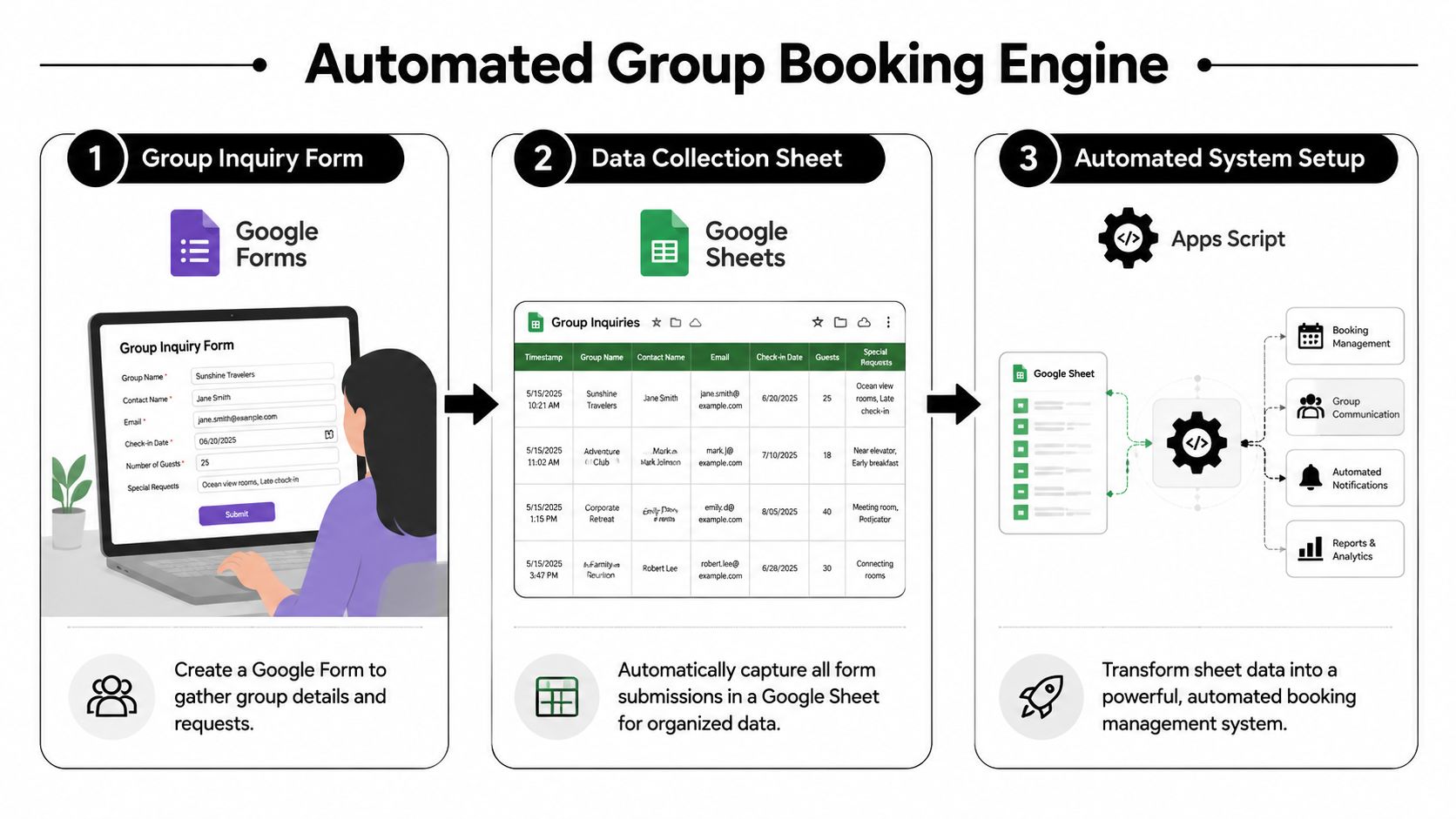
Build the form like an operator
Start with one Google Form as the only official entry point for group requests. Don't accept “just email me the details” as a normal alternative unless you want staff to keep rebuilding records by hand.
Your form should collect the fields that drive decisions. A good baseline includes:
- Organizer details: Name, email, mobile number, organization.
- Booking intent: Event choice, preferred date, estimated group size.
- Offer selection: Package type, seating preference, add-ons, accessibility needs.
- Operational notes: Invoice request, roster deadline, special instructions.
Use dropdowns and multiple-choice options wherever possible. Free-text fields create more cleanup work than is typically expected.
Build forms for sorting first, reading second. Structured answers make Sheets useful.
If you need a starting point for field structure and registration logic, this event registration template guide is a useful reference for how to turn intake fields into something operations can run.
Turn the sheet into a working system
Every submission should land in one Google Sheet. That sheet becomes your master record, not a temporary inbox replacement.
Set up columns for status and handling, such as:
- Request status
- Quoted package
- Approved quantity
- Payment status
- Seat or zone assignment
- Roster received
- Ticket issued
- Checked in
Color coding helps, but status discipline matters more. If your team doesn't use the same status language consistently, reporting becomes guesswork.
This is the point where an add-on becomes useful. Darkaa is one option that works inside Google Sheets and Google Forms, letting teams map sheet columns to ticket fields, use custom fields from the sheet, generate QR code tickets, and manage check-in without moving the operation into a separate platform.
Keep the workflow inside tools your team already knows
The biggest advantage of this setup isn't novelty. It's adoption. Sales can review requests in the sheet. Operations can assign seating or zones there. Front-of-house can work from the same data source later.
A clean sheet structure usually includes separate tabs for:
- Raw form submissions
- Approved bookings
- Attendee roster
- Ticket output or issuance log
- Event-day reconciliation
You can start simple and add layers only when the volume justifies it. That matters. Many group ticket sales systems fail because they try to mimic enterprise software before the team has stable operating habits.
If the workflow lives in familiar tools, staff is more likely to keep it current. That's what makes the system reliable.
Designing and Distributing Branded Group Tickets
The booking workflow is internal. The ticket is what the attendee sees. If that part looks rushed, the whole program feels less professional, even if the back end is organized.
What the attendee should see
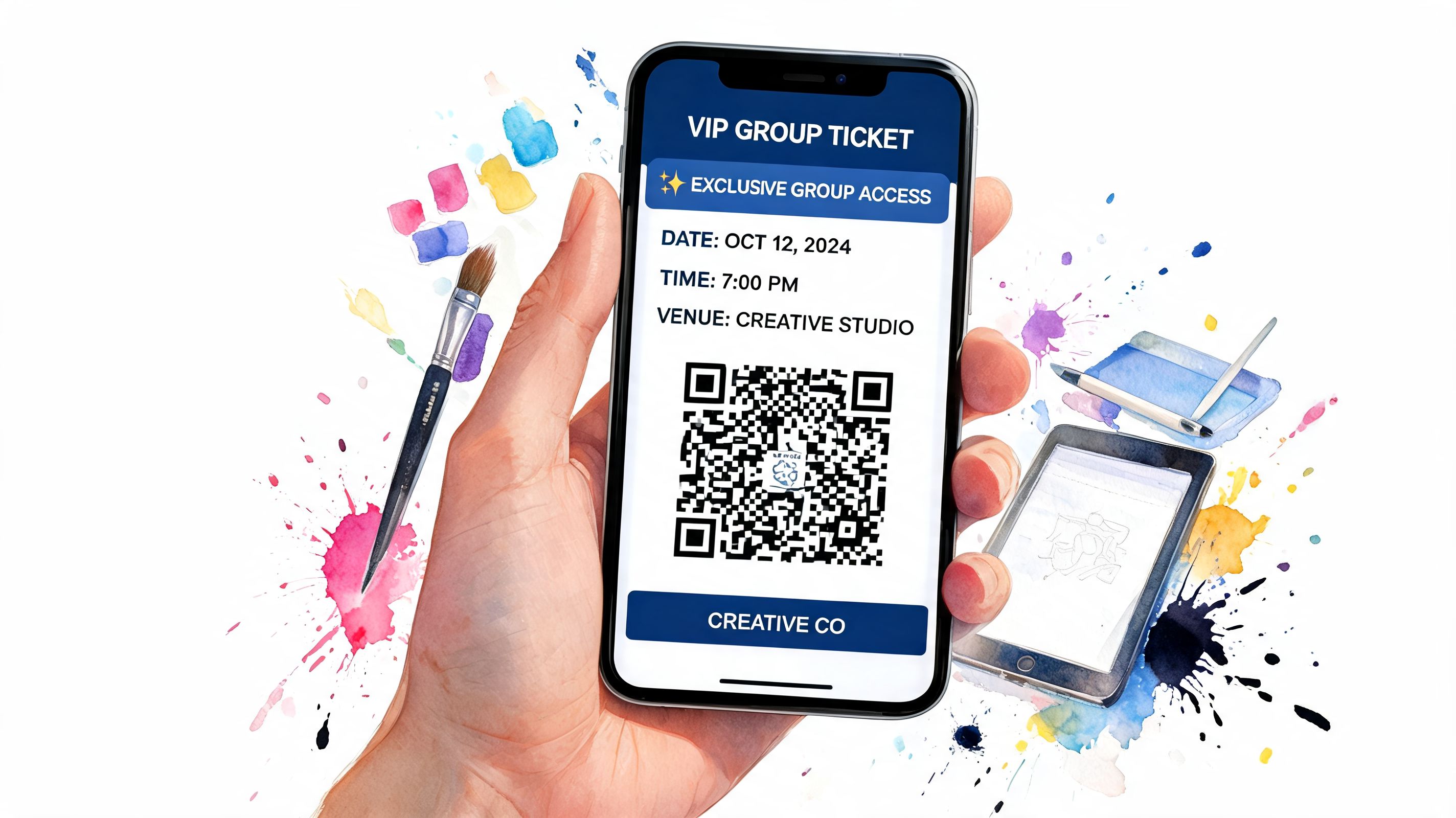
A group ticket should answer the practical questions immediately. Who is this for? What event is it for? Where do they go? What access does it grant? If relevant, what seat or section applies?
For that reason, the ticket design should pull directly from sheet data instead of relying on manual editing. Typical fields include attendee name, group name, event name, date, entry instructions, and a unique QR code for verification. If you're building richer digital experiences around the ticket, the same logic used in QR code setup for wedding highlight reels is useful. The code should take the attendee somewhere purposeful, not just exist as decoration.
Branded design matters too. Use your logo, event colors, and a layout that makes the scannable code easy to find. If the code is buried under decorative elements, staff at the entrance pays the price.
For teams that want wallet-ready digital ticket layouts and more control over branded outputs, this advanced ticket designer and wallet pass reference shows the kind of fields and formatting options worth planning for.
Choose the right delivery method for the group
There isn't one correct distribution method. The right one depends on how the organizer manages their attendees.
Here are the common models:
- Organizer-only delivery: Send the full group allocation to one lead contact. This works for smaller, tightly managed groups.
- Individual attendee delivery: Send each ticket to the named attendee. This reduces forwarding errors and improves name accuracy.
- Hybrid delivery: Organizer gets master visibility while attendees receive their own tickets once the final roster is set.
The mistake is choosing one method for every use case. School groups often prefer centralized control. Corporate hospitality groups often benefit from direct delivery to guests. Family and social groups can go either way depending on who is organizing.
Don't force the organizer to become your manual fulfillment department if the system can send the right ticket to the right person automatically.
Also decide early whether attendee names can change after issue, whether seats are locked, and who can request corrections. Those rules are small until they aren't.
Mastering On-Site Check-In and Post-Event Analysis
Event day exposes every weak assumption in your process. If names weren't standardized, if tickets were sent in mixed formats, or if group leaders weren't clear on arrival procedures, the entrance team feels it first.

Run arrivals with one source of truth
The strongest setup is simple. Staff scans the QR code, the ticket status updates against the master record, and everyone works from the same attendance state.
That matters even more with groups because arrivals are rarely neat. Some people show up with the organizer. Others arrive later. A few may have forwarded the wrong file or be standing in the wrong queue. If your team can search one record and see whether the ticket was issued, replaced, or already scanned, the line keeps moving.
If your venue has unreliable connectivity in certain areas, plan for that before event day. This offline check-in guide is worth reviewing because group arrivals are exactly when weak connections become operational problems.
A practical entrance plan usually includes:
- One scanning workflow: Don't mix printed lists, inbox screenshots, and separate scanner apps.
- A staffed exception lane: Handle name mismatches and organizer issues away from the main queue.
- Clear group arrival instructions: Tell leaders where to go, what to present, and when roster changes close.
What to review after the event
Post-event analysis is where group ticket sales either become a repeatable channel or reset to zero every time.
Your sheet should let you answer basic questions quickly. Which organizers booked multiple events? Which group types attended as expected? Which packages caused the most support work? Where did no-shows concentrate?
You don't need elaborate dashboards at first. A reliable review often comes down to filtering and sorting:
- By organizer: Who is worth follow-up first.
- By segment: Which audience types fit your offer.
- By package: Which offers sell cleanly and which create exceptions.
- By attendance status: Who booked, who came, and who didn't.
That review changes future operations. It tells you whether pricing needs adjustment, whether delivery rules should change, and whether certain group types need a separate intake path.
Frequently Asked Questions About Group Ticketing
A lot of friction in group ticket sales comes from unanswered operational questions, not from the headline offer itself.
Many team and venue sites still push group buyers into phone calls or email inquiries for larger orders instead of giving them a fully online self-serve path. That gap is why buyers often arrive with basic but important questions about seat control, payment flow, roster changes, and who receives tickets.
FAQ
| Question | Answer |
|---|---|
| Should every group booking go through a sales rep? | No. High-touch handling makes sense for premium or unusual requests, but standard packages should have a self-serve inquiry or booking path. Otherwise your team spends time answering repeat questions instead of managing real exceptions. |
| What's the minimum information to collect from a group leader? | Collect organizer identity, contact details, event choice, estimated quantity, and package or seating preference. Add only the fields your team will actually use later. |
| Should I let organizers submit attendee names later? | Usually yes, especially for schools, corporate groups, and community bookings. Set a clear roster deadline so operations can lock issuance and check-in lists. |
| Is one discount ladder enough for every group type? | Usually not. Different groups buy for different reasons. Shared pricing logic is fine, but package design should reflect buyer context, not just quantity. |
| Should tickets go to the organizer or each attendee? | Use the method that creates the fewest handoffs. Organizer-only delivery works for tightly managed groups. Individual delivery works better when each guest needs their own ticket and instructions. |
| How do I handle attendee name changes? | Allow them up to a defined cutoff, then freeze the record. Name changes without a deadline create check-in confusion and duplicate support work. |
| Can Google Sheets really handle professional group ticket sales? | Yes, if the sheet is structured properly and paired with disciplined statuses, controlled forms, and a ticketing layer. The problem is rarely Sheets itself. It's loose process. |
| What should happen if a large group arrives in waves? | Make sure staff can validate each ticket individually against the same live record. Group arrivals are rarely simultaneous, so your system can't depend on one bulk check-in action only. |
The teams that handle group ticket sales well usually remove avoidable uncertainty. They publish clear rules, standardize intake, and keep fulfillment tied to one record. Buyers notice that immediately because the process feels predictable instead of improvised.
If you want to run group ticket sales inside tools your team already uses, Darkaa is built for that workflow. It connects Google Forms and Sheets to QR code ticketing, branded ticket distribution, and event check-in, which makes it a practical fit for teams that want structure without moving everything into a new system.